
CraftApp
A conversational mobile app for solar installation workers that fixed a compliance chain nobody could see.
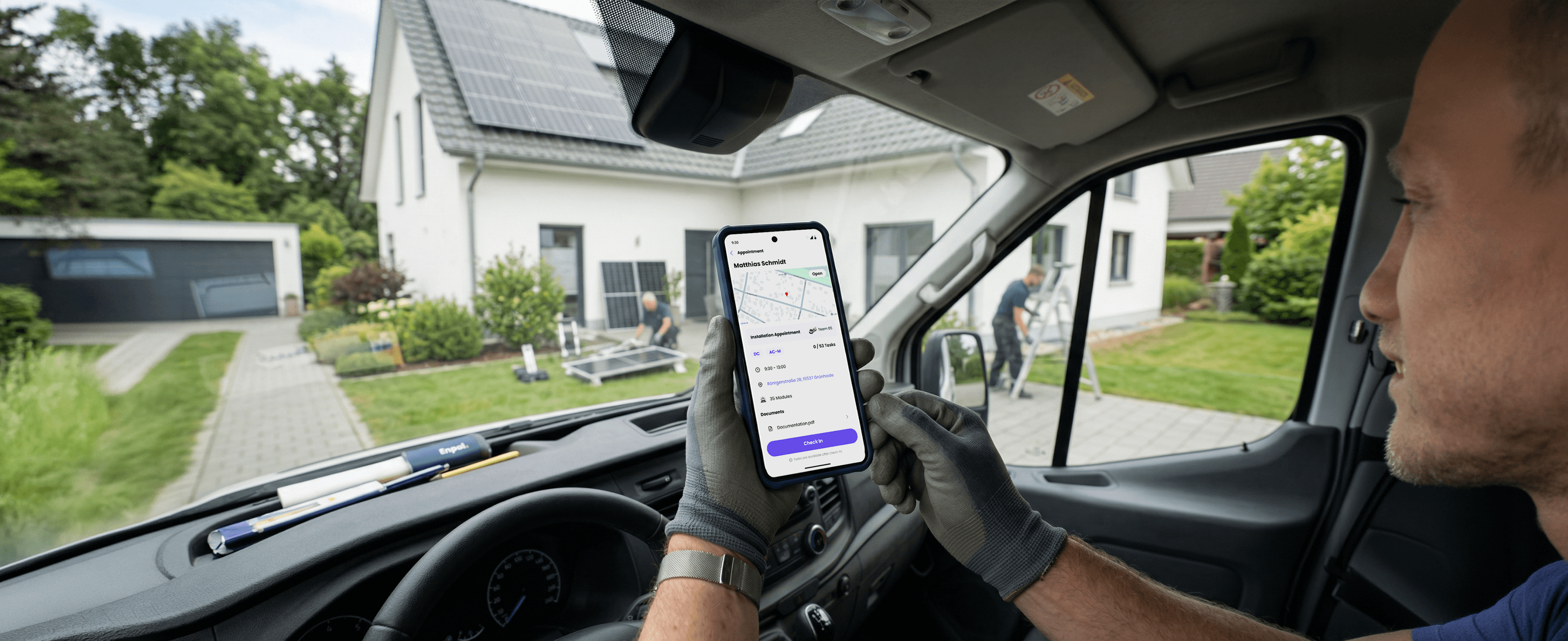
Most tools for field workers are built by people who have never done field work. I wanted to understand what the job actually felt like. Before I opened Figma, I drove to Brandenburg and spent a full day on site with the installation teams. Everything I learned there shaped what I built.
The Problem
As Enpal grew and new technicians were hired, more tasks were being rejected due to QA. Workers had to return to job sites and redo their documentation. Each callback cost time and money.
Outcome
The FTC rate went from 65% to 95%. Quality review cycles improved by 3x. Technicians started using the app without any training push. The reduction in rework translated directly to millions of euros in recovered revenue.
Role
Foundational designer, end to end
Team
Senior Director Product, Product Manager, 6+ Engineers
Duration
8 Months
Focus
Operations & UX
Platform
Android, Flutter
Design brief
fix field documentation loop via CraftApp
We should build a mobile tool that installation teams trust enough to actually use, and that gets work approved correctly the first time.
01
Adoption must be tackled
How do we turn a stressful wait into a live conversation between the field and the office?
02
Working conditions should be considered
How do we make documenting work feel like a natural part of the job, not something added on top of it?
03
Empathetic communication
How do we make sure a technician always knows what to do when their submission is rejected, so they can fix it the same day without a second trip?
Problem statement
EMG installation technicians were completing high-quality work but failing to get it approved on the first try. The tools they had were built for desks, not rooftops. Documentation moved to 3rd party tools because that is what actually worked. The approval chain was invisible, and the FTC rate showed it.
User research
process & plan
I visited two branches and spent time with the teams on site. The goal was to see how the work actually happened, to validate what the office believed.
01
Observatory field visits
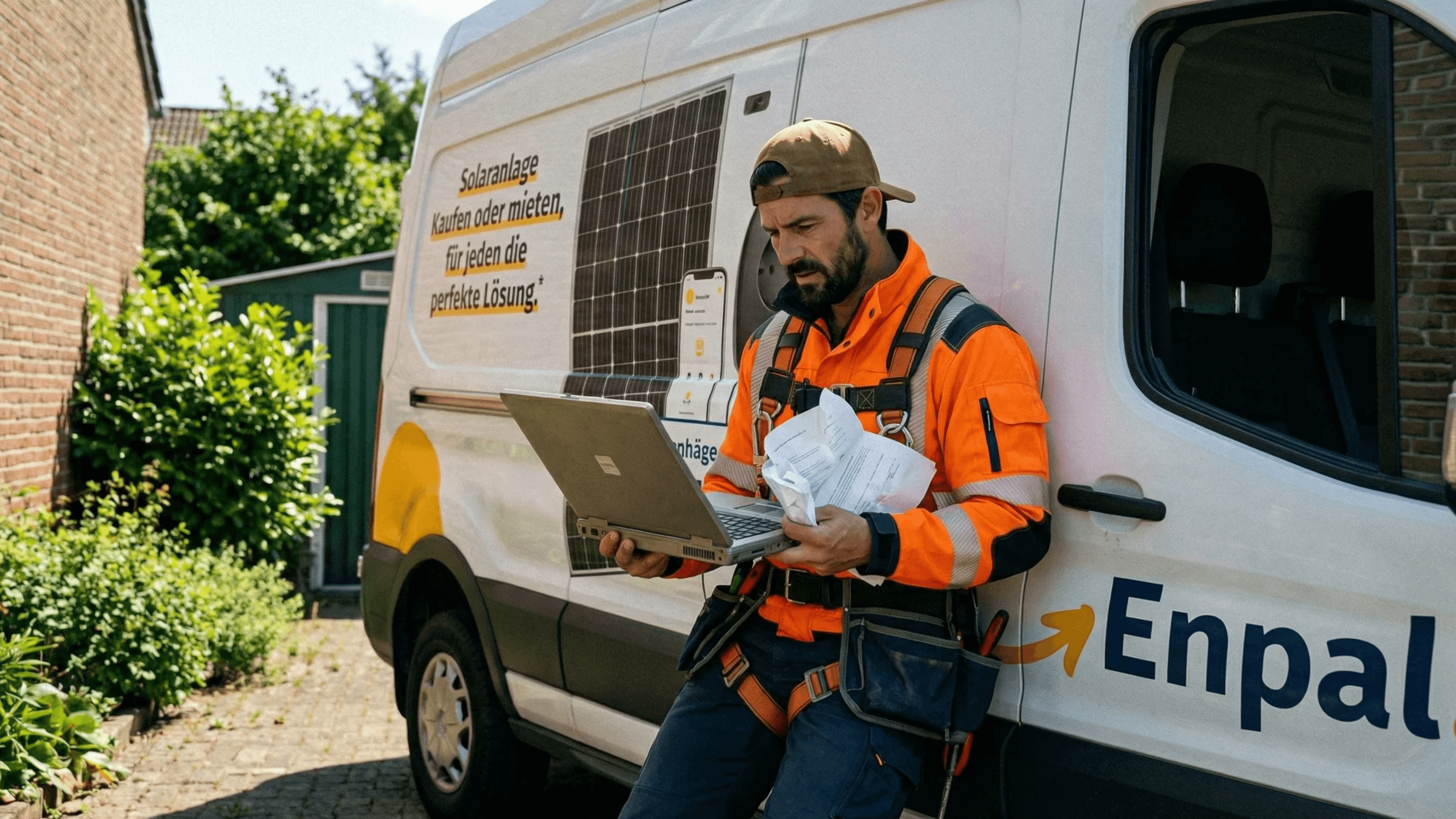
I joined installation crews in Brandenburg and Erfurt from early morning until the day was done. I drove to different branches specifically to compare how they operated differently. These visits became the foundation of everything.
02
Branch & stakeholder interviews
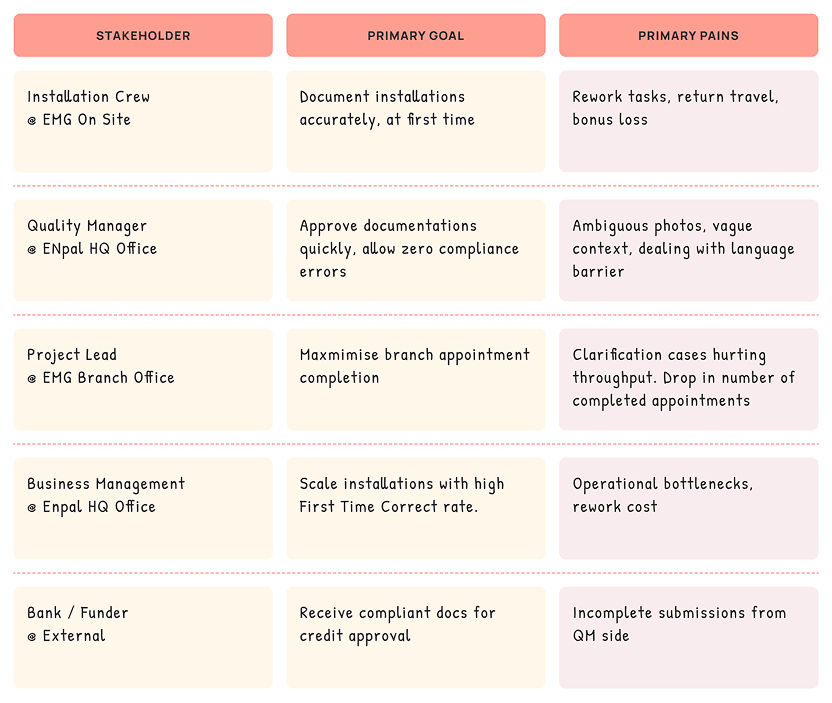
At each branch office I spoke with branch managers and project leads about targets, pressure points, and team structure. The gap between what HQ assumed and what actually happened on the ground was larger than anyone had acknowledged.
03
Semi-structured interviews
I spoke with teams and quality managers, those are the two people at the centre of this broken loop. With technicians I explored what rejections were handled in practice. With quality managers I focused on how they chose submissions and what happened when clarification was needed.
User research
results & insights
The field teams and the office were each trying to solve the same problem in completely different ways. Neither side knew what the other was doing.
“We just use WhatsApp”
Every branch had built its own network of group chats with project leads. The official tool existed in name only — workers weren’t resisting it out of laziness. They had already found something that worked better.
Technicians didn’t know why they were rejected
Quality manager feedback was inconsistent and changed from branch to branch. The same photo could be accepted in one city and rejected in another. Technicians had no reliable signal for what good enough actually meant, and the FTC rate reflected that.
The team structure in the Airtable was wrong
HQ assumed fixed teams. In practice, technicians moved between crews and electricians worked independently. The structure was being built for an organization that did not exist on the field.
QMs were choosing which submissions to review
With all pending submissions visible at once, simpler ones were picked first. Complex work waited, sometimes for hours. Technicians had no idea their job type was the reason for the delay. This became a separate project workstream.
Three questions
from the field
HMW 01
Make documentation part of the installation:
How might we make taking photos and logging information feel like a natural step in the work, not something separate that gets in the way?
HMW 02
Bring real-time feedback into a compliant system:
How might we give them the experience from messaging services inside a system the company could actually rely on?
HMW 03
Make rejection something a technician can act on:
How might we make sure a technician always knows what to do when their submission is rejected, so they can fix it the same day without a second trip?
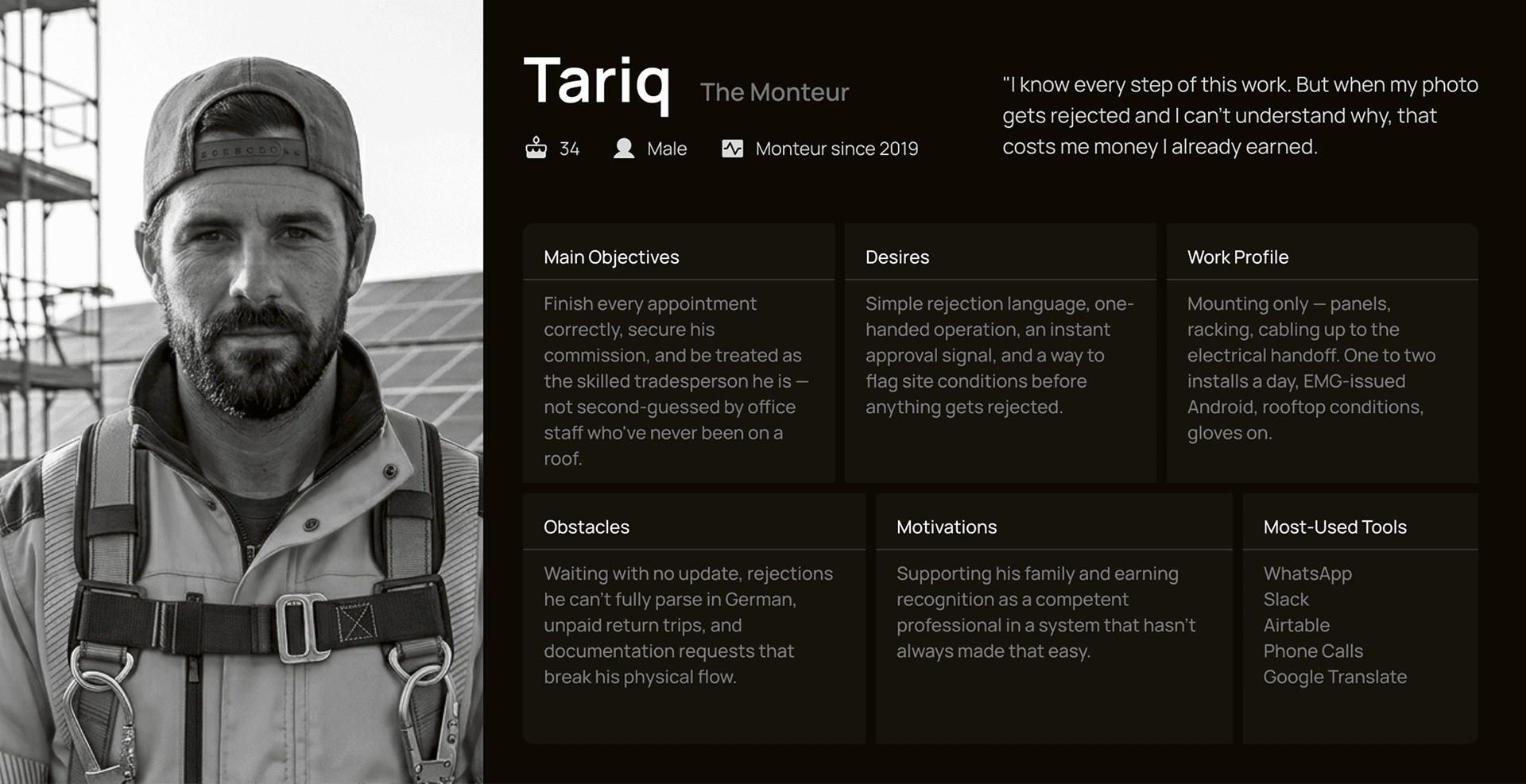
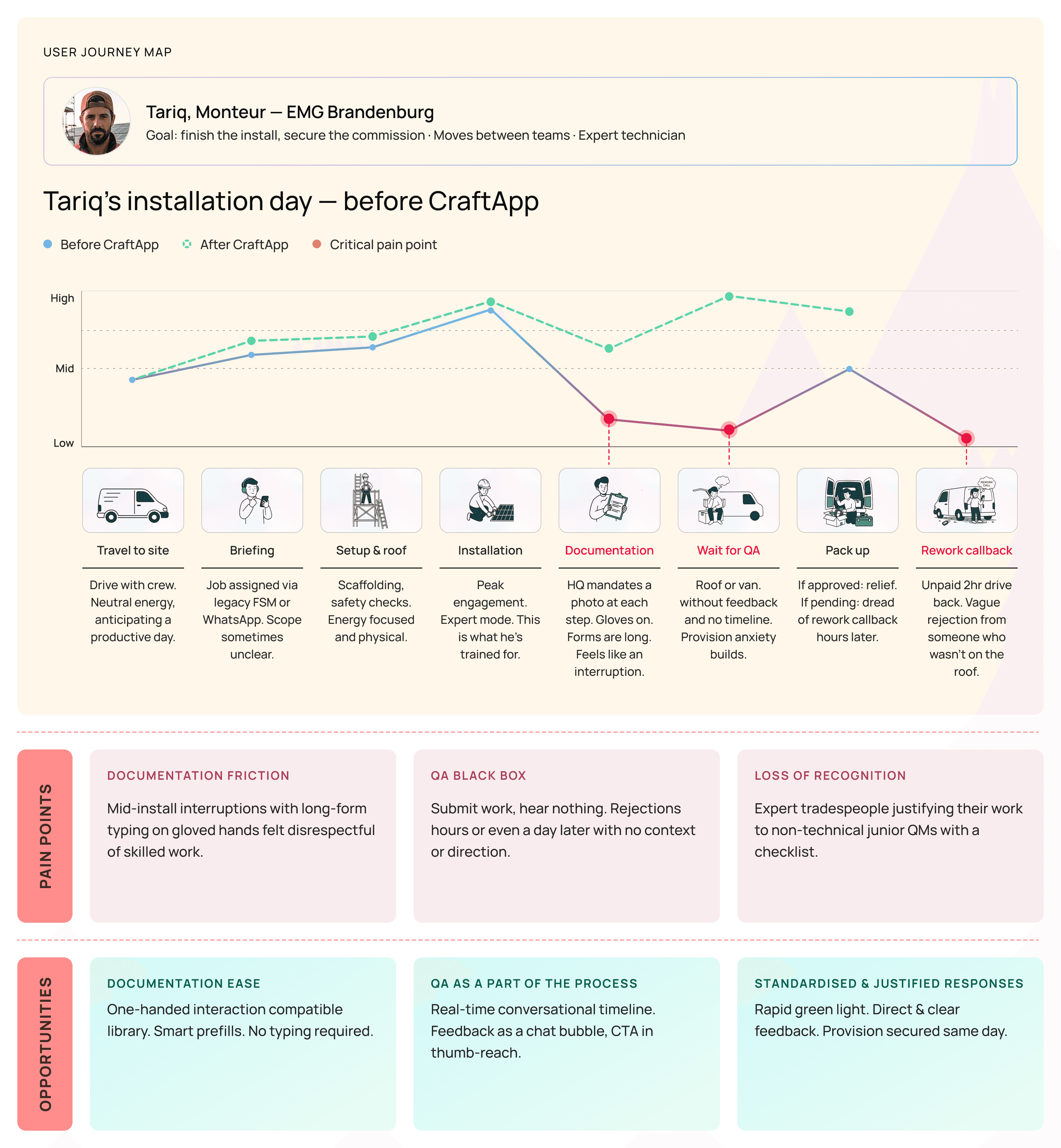
Meet Tariq the Monteur
from on site research
Tariq is a solar panel installer at EMG Brandenburg. He moves between teams and works multiple jobs a week. He is very good at this work and he knows it. He does not think of himself as a technology user. His phone is a tool, the same as his drill.
A day in the field
before CraftApp
I mapped to show stakeholders where the experience broke down and where there was room to improve it.
The Strategy
that changed the loop
User research revealed that the friction wasn't just technical; it was emotional. Technicians felt judged by a "black box" system, leading them to abandon official channels for the transparency of WhatsApp. To fix the loop, I established three core pillars for the interaction model.
01
Make approval feel like a conversation
Instead of a rigid submission-feedback loop, the UX should mimic the cadence of a conversation. Success meant moving away from "forms" and toward a "thread" mental model where information flows bi-directionally.
02
Build for one hand on a rooftop
The interface must respect the environment. I adopted a "rooftop-first" philosophy, prioritizing high-contrast legibility and single-thumb ergonomics to reduce the cognitive and physical load of field documentation.
03
Structured communication
To close the loop efficiently, feedback must be persistent, not ephemeral. My strategy focused on embedding reviewer insights directly into the capture workflow to prevent context-switching.
Design Principles
core interaction rules
Three constraints shaped the design library and every interface decision.
01
One hand, always
If an action requires two hands, it’s a failure. I optimized for the single thumb to keep the technician’s other hand free for their work.
02
Readable in direct sunlight
I prioritized high-contrast values and large-scale elements to ensure the UI stays functional in direct, reflective light.
03
Status at a glance
I made sure every action has a clear, immediate response. By surfacing live status signals, I removed the guesswork and "black box" frustration from the user experience.
Low-Fidelity Logic
flow before form
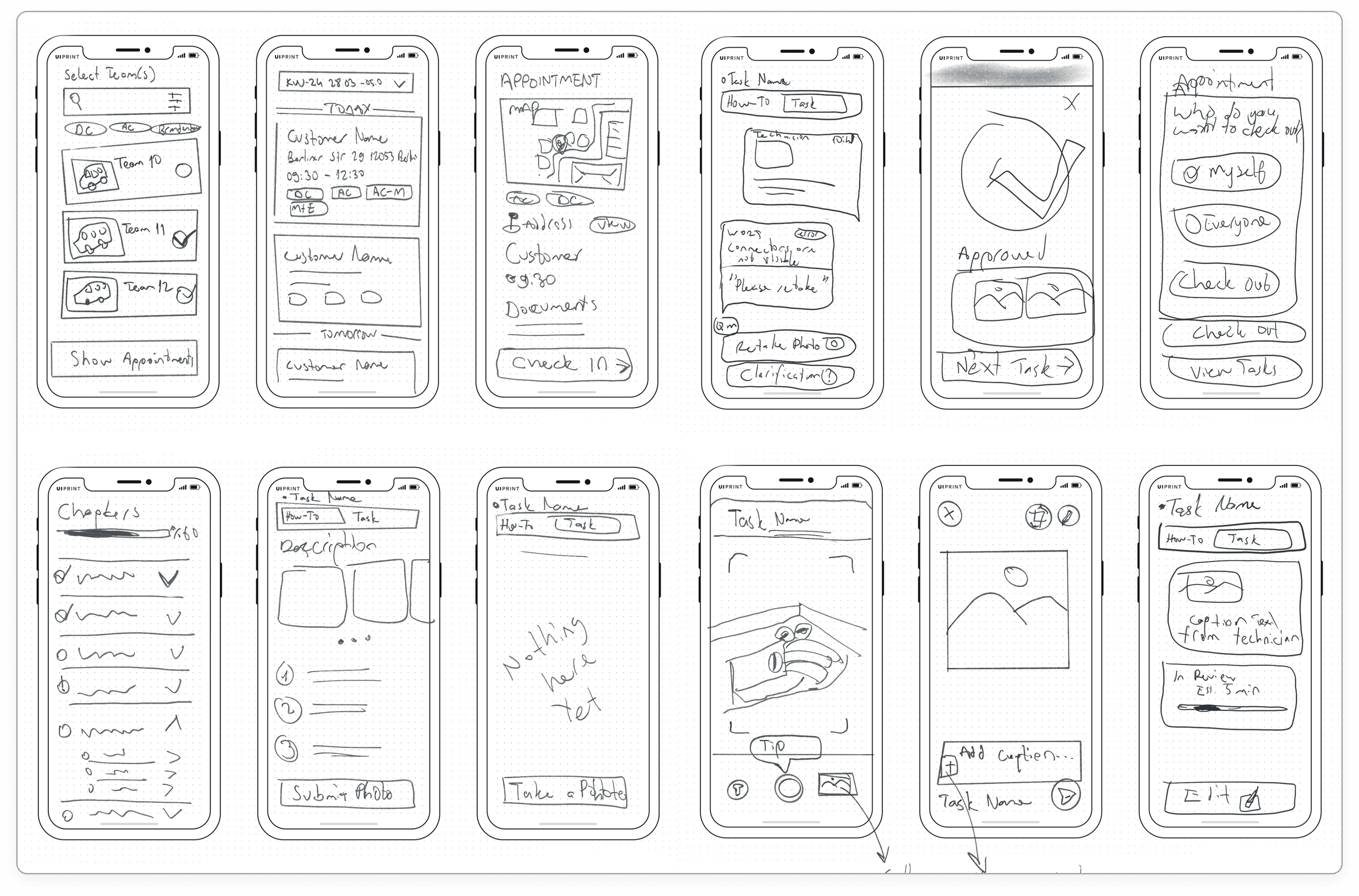
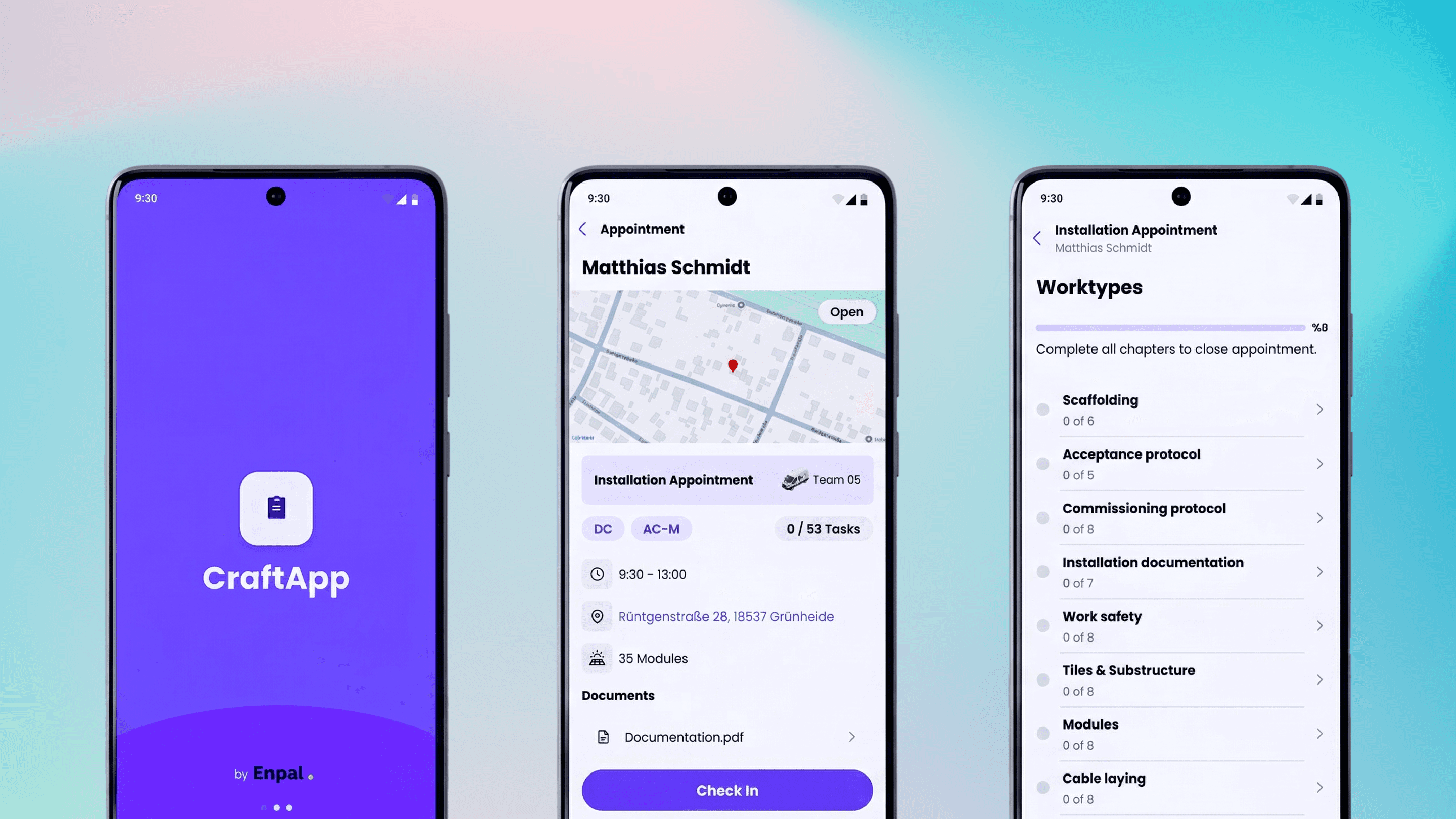
Before any visual decisions, I sketched the full app to answer one question. Could a technician move from choosing their team to submitting a photo without ever stopping to think about where to tap?
01
Two-tab task structure
A How-to Guide tab and a Submission tab appeared in the first sketch. Reading and documenting are separate things. They should not compete for the same screen.
02
Chapter status at a glance
The chapter list needed to show more than names. Early sketches had simple checkmarks. The status ring system in the final design grew from that idea.
03
Submission as a conversation
Technicians already trusted Slack or Whatsapp for real work coordination. The submission screen needed to feel the same way. That decision was made in pencil, before Figma was opened.
Building a robust
design system
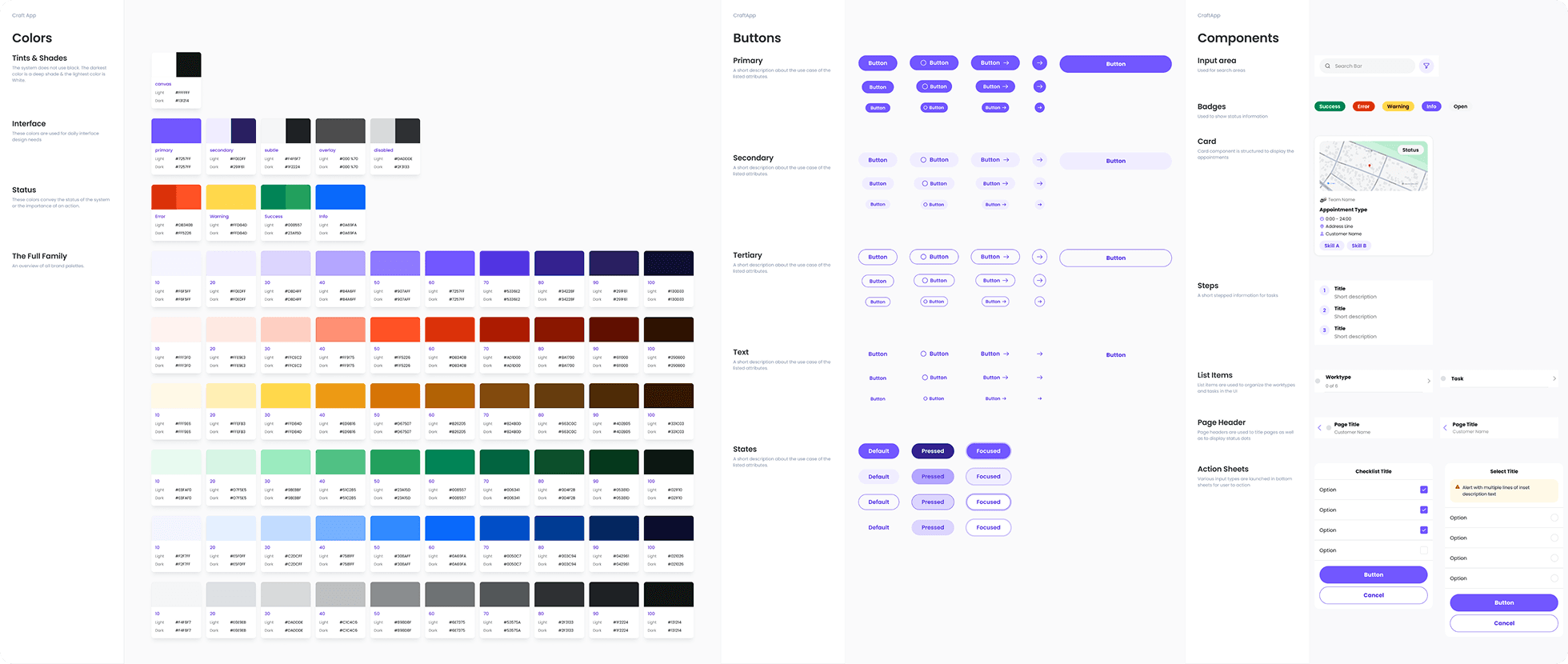
I've created a design system built to scale across the full app without visual inconsistency.
Onboarding
for installation day
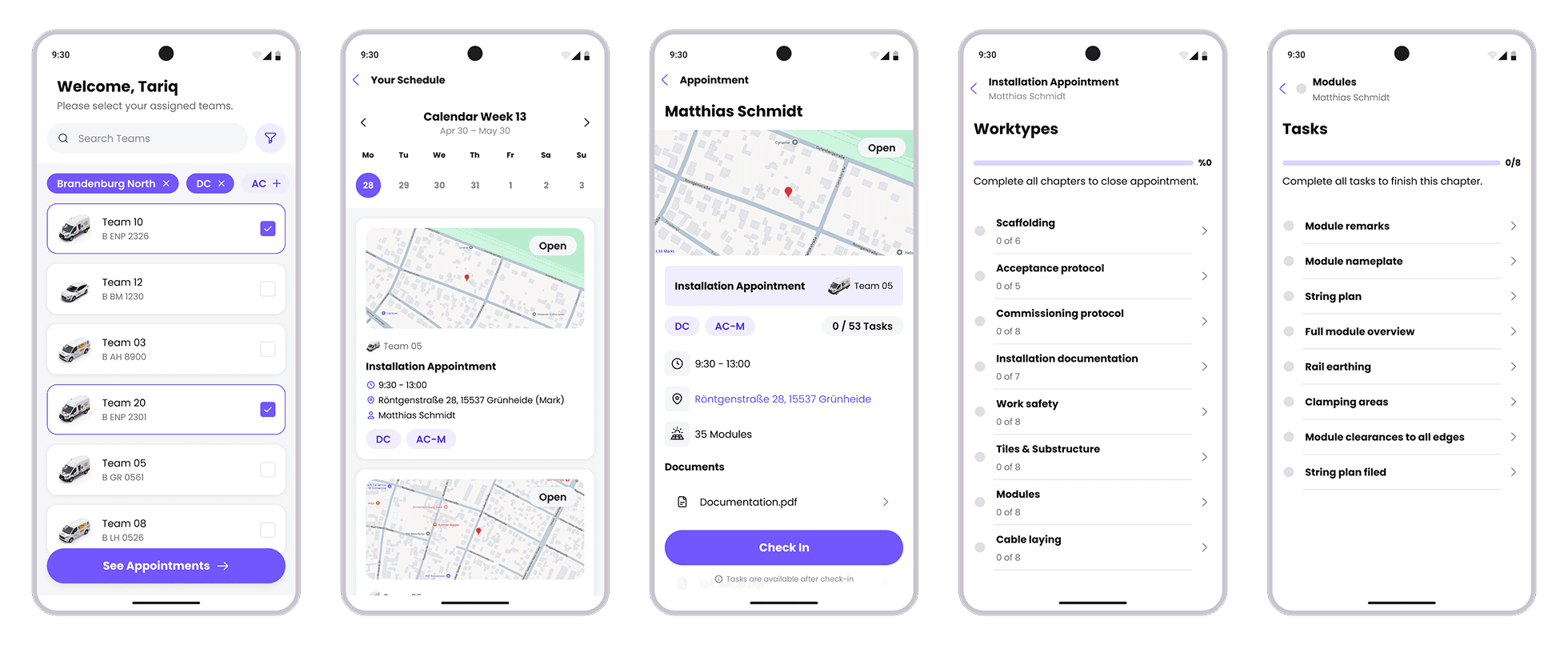
Tariq begins each day by selecting his team and checking the week's jobs. One tap into an appointment shows everything he needs before arriving on site.
Guide first
submit with context
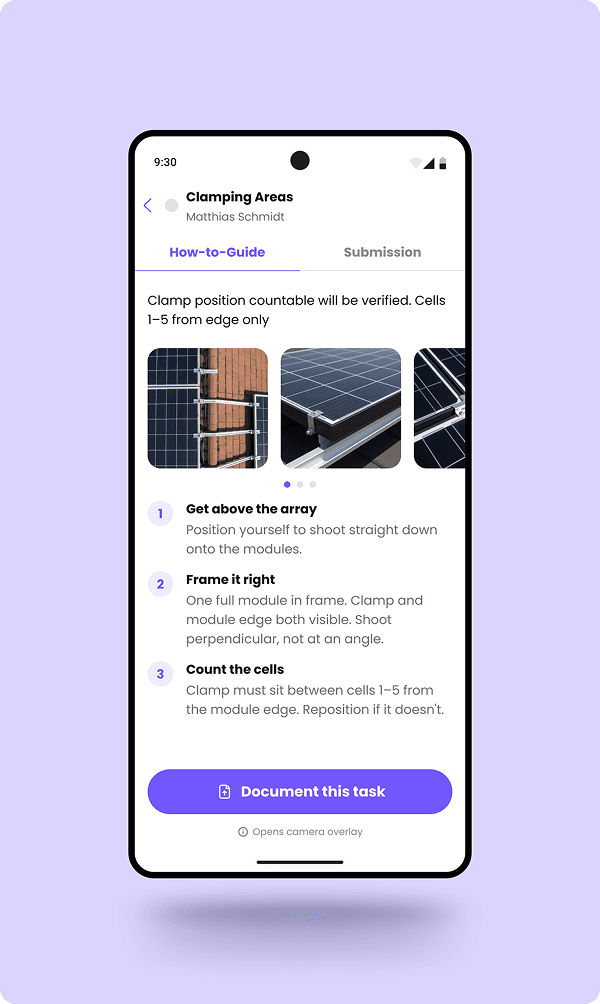
Every task opens with a guide showing what to do, what a correct photo looks like, and what the reviewer will check. Tariq submits without typing a single word.
01
Photos from real approved submissions
Swipeable reference images, selected by quality managers from actual past approvals. Not stock photos, not illustrations.
02
The review criteria before the steps
The first thing a technician reads is what the quality manager will check. No guessing about what a passing submission looks like.
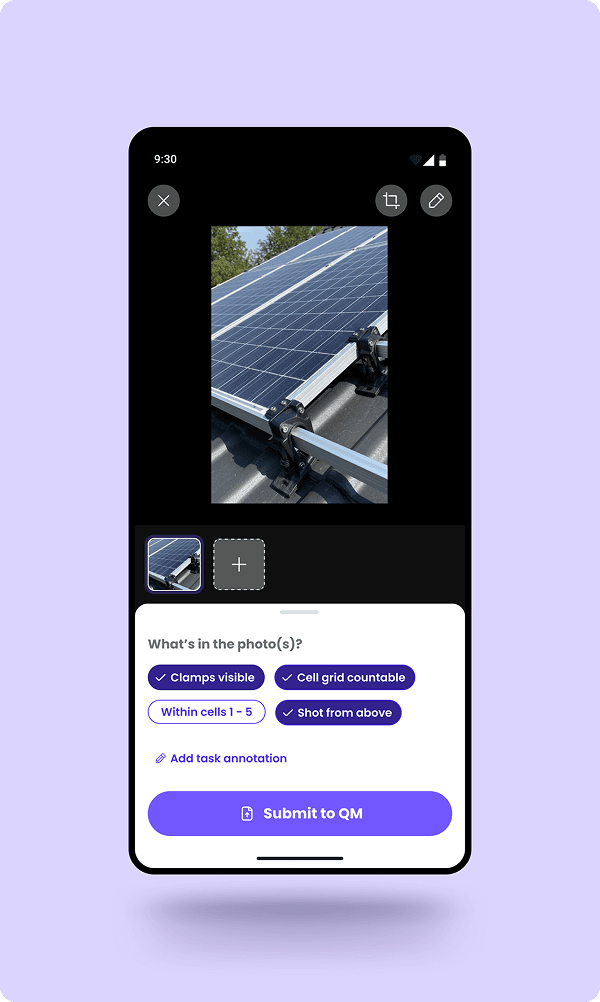
01
Tags instead of a keyboard
After shooting, Tariq selects what the photo shows from a short list. One tap per tag, specific to the task type, no generic labels.
02
Multiple photos, one submission
Some tasks need more than one angle. Tariq can add shots before submitting. The tags apply across all of them.
01
Photos from real approved submissions
Swipeable reference images, selected by quality managers from actual past approvals. Not stock photos, not illustrations.
02
The review criteria before the steps
The first thing a technician reads is what the quality manager will check. No guessing about what a passing submission looks like.
01
Tags instead of a keyboard
After shooting, Tariq selects what the photo shows from a short list. One tap per tag, specific to the task type, no generic labels.
02
Multiple photos, one submission
Some tasks need more than one angle. Tariq can add shots before submitting. The tags apply across all of them.
Closing the Loop
real-time feedback & validation
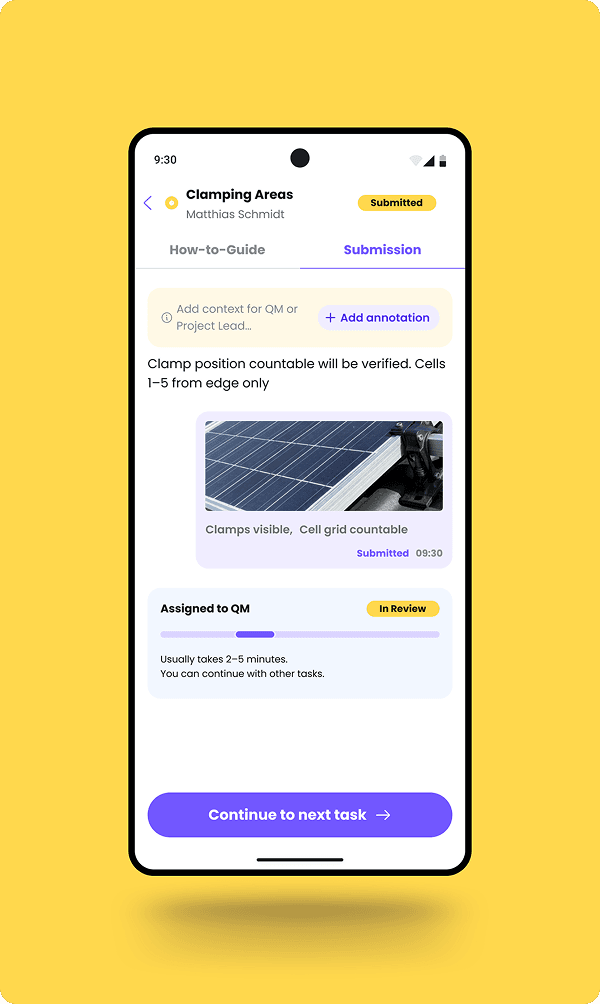
After submitting, Tariq can see the status of his work in real time. When the QM responds, a clear result appears immediately. No waiting, no guessing.
01
Managing Expectations
Estimated wait time and a clear nudge to continue eliminates the idle anxiety technicians felt waiting for a response that might never come.
02
Non-Blocking Workflow
Tariq doesn’t wait on the roof. He moves to the next task while QM reviews — the installation stays in flow.
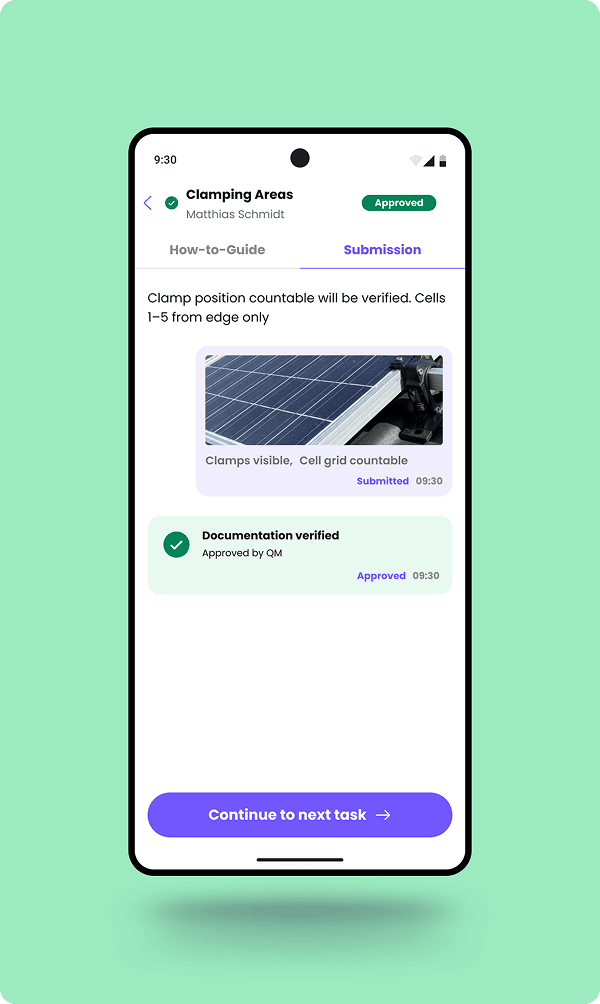
01
Full audit trail preserved
The submitted photo and tags remain visible after approval. What was captured, what was tagged, when it was sent — is permanently on record for compliance.
02
The “Rapid Green Light”
A timestamped verdict the moment QM responds. Tariq knows immediately — no waiting on site after installation, no guessing.
01
Managing Expectations
Estimated wait time and a clear nudge to continue eliminates the idle anxiety technicians felt waiting for a response that might never come.
02
Non-Blocking Workflow
Tariq doesn’t wait on the roof. He moves to the next task while QM reviews — the installation stays in flow.
01
Full audit trail preserved
The submitted photo and tags remain visible after approval. What was captured, what was tagged, when it was sent — is permanently on record for compliance.
02
The “Rapid Green Light”
A timestamped verdict the moment QM responds. Tariq knows immediately — no waiting on site after installation, no guessing.
When QM rejects
the loop stays closed
Rejections arrive with the QM's exact words — no interpretation, no delay. Tariq retakes with full context in view, or escalates to the Project Lead if the situation genuinely can't be resolved on site.
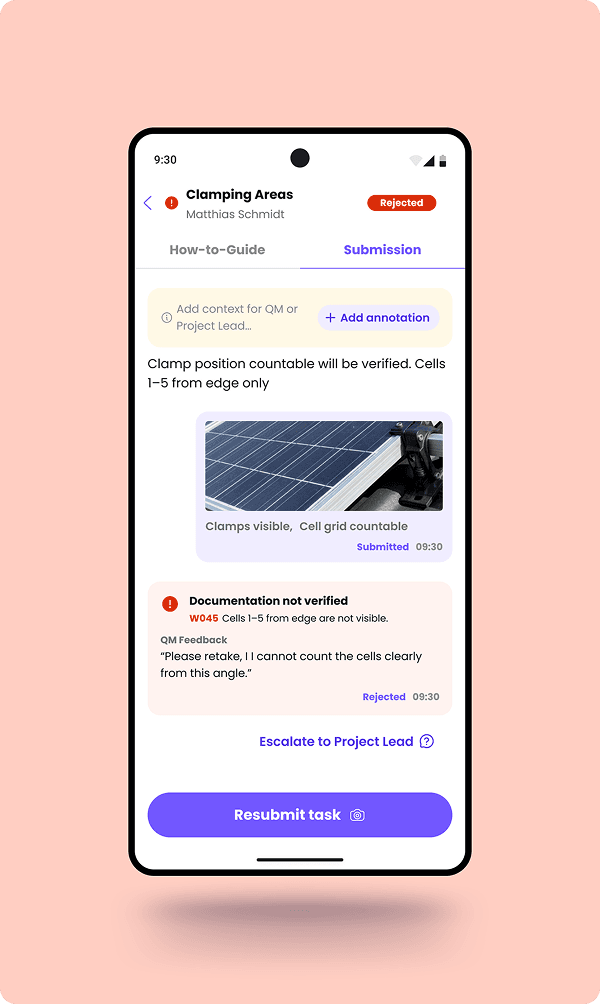
Clear rejection reason
The QM’s note appears verbatim, not paraphrased. Tariq knows exactly what to fix before touching the camera again.
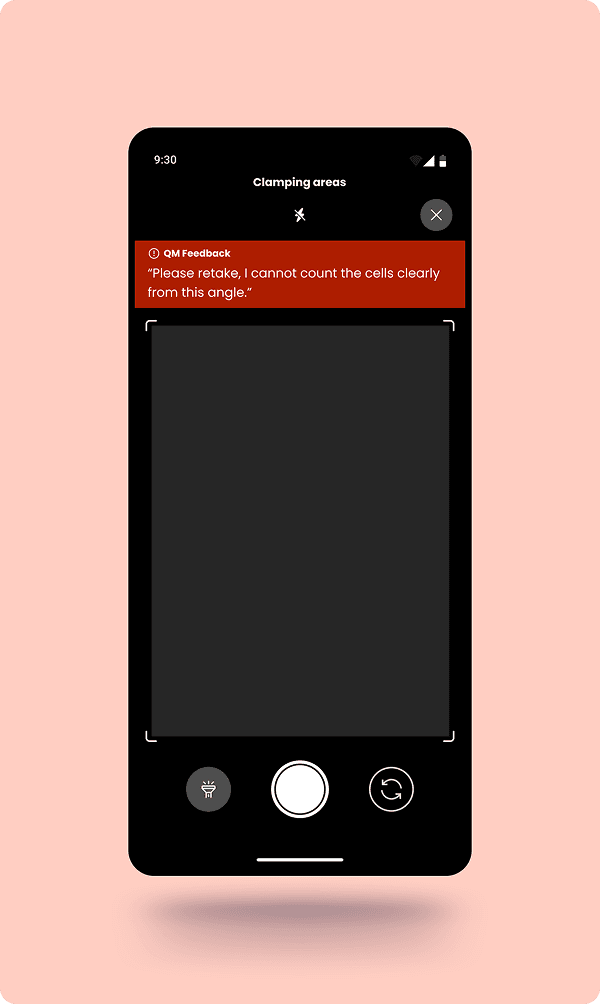
QM feedback in the viewfinder
The rejection reason stays visible while Tariq reframes the shot — no switching screens, no memorising instructions.
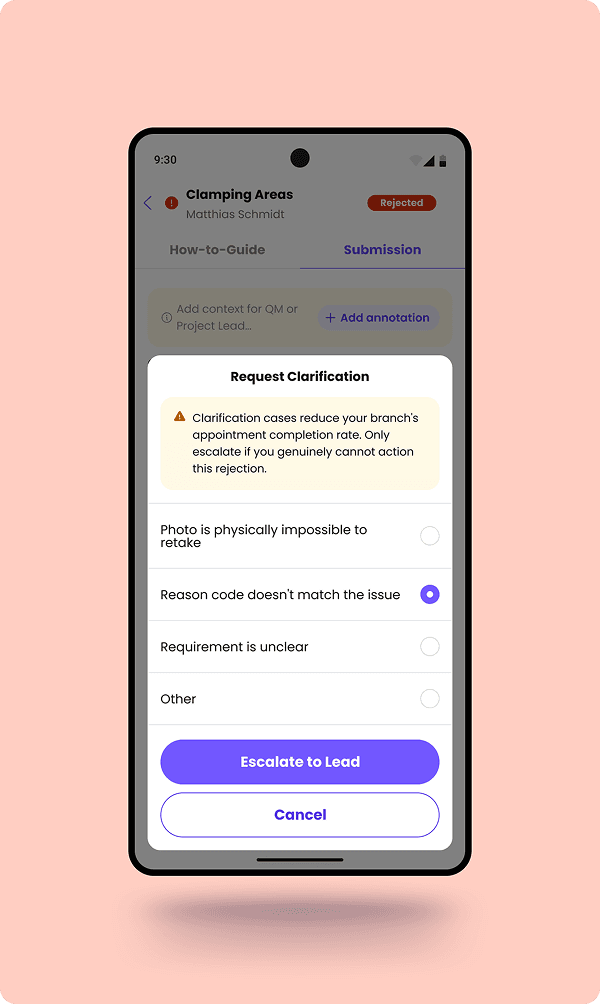
Escalate when retaking isn’t possible
If the situation genuinely can’t be resolved on site, Tariq escalates to the Project Lead with one tap. Pre-written reasons keep it fast — no typing required.
Results
65% → 95%
First-time-correct rate helped more appointments being fulfilled
3X
QA cycle improvement eliminated the back and forth
0
Zero forced adoption. Technicians chose to use it
€+ in Millions
Revenue impact from reduced rework and faster completion
What I learned
The most useful thing I did was, driving to the branches and spending a day with the installation teams. The WhatsApp & Slack workarounds, the "first-time-correct" pressure, the subtle frustration of skilled work being judged without context, none of it appeared in any brief or requirements document.
I found it by being in the right place and paying attention. The compliance chain that nobody could see was not hidden. It just had not been looked for from the perspective of the technician.